最近工作內容之一是寫 php + mySQL, 因為客戶的即有系統是這個環境, 跟承辦聊天幾次, 發現他在開發這個系統時是完全是門外漢, 之前也只寫過 c語言, 而且還是半路出家去資策會上課學的, 所以很多地方都是以 c語言的楖念來寫, 我發現他的系統和程式有這幾個問題:
1. Table 完全沒使用 index, 我使用 MySQL 指令:
SHOW INDEXES FROM account;
查詢帳號 table 裡, 沒有 index, 於是透過下面指令手動幫他加上,
CREATE INDEX account_id ON account (id desc, password desc);
(其他 Table 依此類推...)
2. 程式碼裡看不到多個 table 的join, 完全純手工把第1 table 裡的資料放到陣列裡處理, 再開啟第2個 table, 再處理陣列裡的值.
3. 完全沒有使用到聚合函數, 例如 sum(...), count(...) 等, 也是純手工, 把欄位們一一放到陣列裡, 再透過 php 一個個讀出來加總.
----------------------------------
MySQL 要看欄位 schema 的指令為, 同 MS T-SQL 的 sp_columns:
DESCRIBE table_name;
----------------------------------
MySQL 的只列出前幾筆, 是 Limit , 類似 MS T-SQL 的 Top N
Microsoft SQL Server:
SELECT TOP 10 column FROM table
PostgreSQL and MySQL
SELECT column FROM table LIMIT 10
MySQL 有一個 OFFSET 的指令, 如下指令如下的話會傳回第 21~30筆資料.
SELECT column FROM table LIMIT 10 OFFSET 20
----------------------------------
MySQL 在 select 句裡的欄位合併, 要使用 concat 指令, 直接使用 + (加號) 會變成數字運算.
例如, 欄位 Col_A 和 Col_B 型別都是 char(9)
Col_A 內容是 305152033
Col_A 內容是 305152971
SELECT Col_A + '-' + Col_B;
答案是 --> 610305004
SELECT CONCAT(Col_A, '-', Col_B);
答案是 --> 305152033-305152971
附註: CONCAT() 會傳回 NULL 如果有任何一個被合併的值是 NULL.
SELECT CONCAT('My', NULL, 'QL');
答案是 --> NULL
----------------------------------
相關文章:
Show indexes for a table with MySQL
http://www.electrictoolbox.com/mysql-show-indexes-table/
Get a MySQL table structure with DESCRIBE
http://www.electrictoolbox.com/mysql-table-structure-describe/
MySQL CREATE INDEX Syntax
http://dev.mysql.com/doc/refman/5.0/en/create-index.html
2012年8月16日 星期四

2012年3月13日 星期二
php 無法輸出正確的 content type 的設定方式
; PHP's built-in default is text/html
default_mimetype = "text/html"
如果, 沒有把 buffering=Off 註解掉, content-type 都只能輸出為 text/html, 無法使用 text/xml, 設定方式參考下列的值:
; Output buffering allows you to send header lines (including cookies) even
; after you send body content, at the price of slowing PHP's output layer a
; bit. You can enable output buffering during runtime by calling the output
; buffering functions. You can also enable output buffering for all files by
; setting this directive to On. If you wish to limit the size of the buffer
; to a certain size - you can use a maximum number of bytes instead of 'On', as
; a value for this directive (e.g., output_buffering=4096).
;output_buffering = Off
output_buffering = 4096
default_mimetype = "text/html"
如果, 沒有把 buffering=Off 註解掉, content-type 都只能輸出為 text/html, 無法使用 text/xml, 設定方式參考下列的值:
; Output buffering allows you to send header lines (including cookies) even
; after you send body content, at the price of slowing PHP's output layer a
; bit. You can enable output buffering during runtime by calling the output
; buffering functions. You can also enable output buffering for all files by
; setting this directive to On. If you wish to limit the size of the buffer
; to a certain size - you can use a maximum number of bytes instead of 'On', as
; a value for this directive (e.g., output_buffering=4096).
;output_buffering = Off
output_buffering = 4096
2012年2月7日 星期二
[youtube].取得上傳的影片處理狀態(Upload status)
研究 youtube 提供的 api, 在上傳影片後的變化.
1.首先, 上傳影片:

2. 透過下面的程式碼, 來取得影片的狀態:
$yt = new Zend_Gdata_YouTube();
$videoEntry = $yt->getVideoEntry($id);
$state = $videoEntry->getVideoState();
if ($state) {
echo 'Upload status for video ID ' . $videoEntry->getVideoId() . ' is ' .
$state->getName() . ' - ' . $state->getText() . "\n";
} else {
echo "Not able to retrieve the video status information yet. " .
"Please try again later.\n";
}
3. 在上傳影片之後, youtube 處理完成之前取得的狀態:

說明: $state = true,
During 取得的值是0, 而且縮圖的時間也都停在0.
4. 在上傳影片之後,

說明: $state = false,
During 取得的值是85, 而且縮圖的時間也不是都停在0.
youtube php API 文件:
http://code.google.com/intl/zh-TW/apis/youtube/2.0/developers_guide_php.html#Checking_Upload_Status
安裝好Zend Framework, 也會有更詳細的 API 文件在資料夾:
/www/ZendGdata/documentation/api/core/db_Gdata_YouTube.html
附註: 經測試之後, app 授權方式必須使用 "ClientLogin for installed applications" 不然會抓不到影片被拒絕的原因, 上傳的檔案被拒絕(rejected), 可能是有危反版權宣告,或是影片重覆上傳.

1.首先, 上傳影片:

2. 透過下面的程式碼, 來取得影片的狀態:
$yt = new Zend_Gdata_YouTube();
$videoEntry = $yt->getVideoEntry($id);
$state = $videoEntry->getVideoState();
if ($state) {
echo 'Upload status for video ID ' . $videoEntry->getVideoId() . ' is ' .
$state->getName() . ' - ' . $state->getText() . "\n";
} else {
echo "Not able to retrieve the video status information yet. " .
"Please try again later.\n";
}
3. 在上傳影片之後, youtube 處理完成之前取得的狀態:

說明: $state = true,
During 取得的值是0, 而且縮圖的時間也都停在0.
4. 在上傳影片之後,

說明: $state = false,
During 取得的值是85, 而且縮圖的時間也不是都停在0.
youtube php API 文件:
http://code.google.com/intl/zh-TW/apis/youtube/2.0/developers_guide_php.html#Checking_Upload_Status
安裝好Zend Framework, 也會有更詳細的 API 文件在資料夾:
/www/ZendGdata/documentation/api/core/db_Gdata_YouTube.html
附註: 經測試之後, app 授權方式必須使用 "ClientLogin for installed applications" 不然會抓不到影片被拒絕的原因, 上傳的檔案被拒絕(rejected), 可能是有危反版權宣告,或是影片重覆上傳.

2012年1月9日 星期一
[Asp].自動上傳影片到 youtube的範例.
step 1: 利用 google帳號及取得developerKey
URL: http://code.google.com/apis/youtube/dashboard/
step 2: 把取得的 developerKey 寫入我們的設定檔.
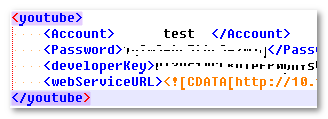
說明: 由於這個年代沒有人在寫 Asp 了, 反正程式的邏輯是一樣的, 你可以下載你看的懂的 sample code 下來看:
https://developers.google.com/youtube/code_samples
step 3: 透過 max牌 youtube object, 測試看看把本機的檔案傳上 youtube.
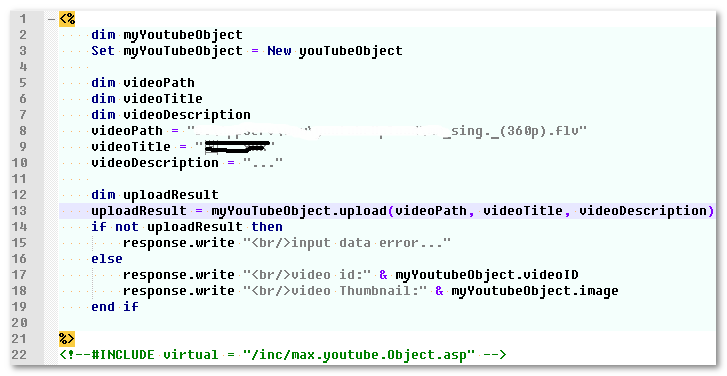
* 參數說明: videoPath(本機路徑) + videoTitle(標題) + descript(說明)
step 4: 測試可以用之後, 把 youtube object 放到開發中的專案裡, 上傳前 youtube 影片數=0.
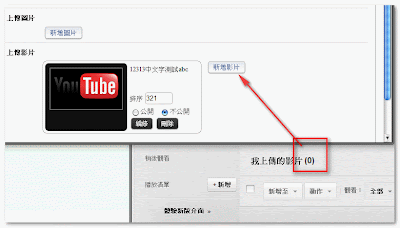
step 5: 上傳影片, 上傳後 youtube 影片數=1.

URL: http://code.google.com/apis/youtube/dashboard/
step 2: 把取得的 developerKey 寫入我們的設定檔.

說明: 由於這個年代沒有人在寫 Asp 了, 反正程式的邏輯是一樣的, 你可以下載你看的懂的 sample code 下來看:
https://developers.google.com/youtube/code_samples
step 3: 透過 max牌 youtube object, 測試看看把本機的檔案傳上 youtube.
* 參數說明: videoPath(本機路徑) + videoTitle(標題) + descript(說明)
step 4: 測試可以用之後, 把 youtube object 放到開發中的專案裡, 上傳前 youtube 影片數=0.

step 5: 上傳影片, 上傳後 youtube 影片數=1.

- * 附註1: 由於 youtube 處理縮圖需要時間, 30秒~90秒不一定, 而且還要視上傳的影片內容的編碼方式和大小而定.
- * 附註2: 關於處理縮圖的時間點, 比較好的解法是, 透過程式去檢查 Video API, 取得 video status, 等youtube 處理完成後, 再去取縮圖, 這個我還沒去實作, (偷懶的解法) 取縮圖的部份修改為: 等 user 完成整個文檔的編輯, 並按下 submit 後, 再從 youtube 來取縮圖.
2012年1月8日 星期日
php 處理中文檔案時file does not exit or is not readable
最近在寫 php, 遇到 php處理中文檔案時file does not exit or is not readable, 錯誤的畫面如下:

解法:
$filename_new=iconv("UTF-8","Big5",$filename_old);
把編碼轉成 big5 就ok了.
先用 is_readable() 測試看看, 問題發生的原因是什麼, 看看是安全性的問題, 還是中文字的問題.

後來使用多組的測試路徑, 測出來的結果是中文檔案遇到的問題, 改用 iconv() 即可使程式在處理時變成 readable.


解法:
$filename_new=iconv("UTF-8","Big5",$filename_old);
把編碼轉成 big5 就ok了.
先用 is_readable() 測試看看, 問題發生的原因是什麼, 看看是安全性的問題, 還是中文字的問題.

後來使用多組的測試路徑, 測出來的結果是中文檔案遇到的問題, 改用 iconv() 即可使程式在處理時變成 readable.

訂閱:
文章 (Atom)