2012年7月20日 星期五
測試IIS 的 URL 的 GET 模式可以傳多少變數內容
我的情況是每一個單位長度9碼,還會有一個逗號做間隔, 每一筆是總共占掉10個 bytes, 假設 deptID(單位代碼) 有 510筆, id 變數內容有 5100 bytes(510筆 x 10 bytes), 整個 queryString 因為還要加上 "id=" 的這3個 bytes, 所以是 5103 bytes.
程式碼, 增加到 511筆時:
就到 Web Server 的極限值了, deptID 的長度應該要到 5110 bytes 可是只拿到 5102 bytes, queryString 應該是 5113 bytes, 可是只拿到 5105 bytes.
結論: 以一個單位占9碼來說, 大約可以傳500筆的單位資料在 URL 裡.
附註: 不一樣的 Web Server 都會有落差, 有尤其是 Windows Server 2008 的 IIS 7, 預設值很小...
相關文章:
IIS6 遇到 URL 太長造成 Bad Request (Request Header Too Long)
http://maxtellyou.blogspot.tw/2012/06/iis6-url-bad-request-request-header-too.html
Error message when you visit a Web site that is hosted on a server that is running Internet Information Services 7.0: "HTTP Error 404.10 - REQUEST_HEADER_TOO_LONG"
http://support.microsoft.com/kb/942077/
2012年4月2日 星期一
Classic ASP Script Error Messages No Longer Shown in Web Browser by Default
In earlier versions of IIS, error messages from classic ASP scripts were sent to a Web browser, by default. Because these error messages might reveal sensitive information to malicious users, IIS 7 disables this feature by default. When your classic ASP scripts encounter an error in IIS 7, you receive the following error message by default:
An error occurred on the server when processing the URL. Please contact the system administrator.
If you are the system administrator please click here to find out more about this error.
You can customize the ASP script error message, and also determine whether to return the script errors to a Web browser. Note: As a best practice for security, you should only enable sending ASP script error messages to a Web browser on a development or test computer; returning script error messages to a Web browser can unintentionally expose more information than you intended to show.
Working with User Access Control
You need to make sure that you follow the steps in this document by using an account that has full administrative permissions. This is best accomplished by using one of two methods:
- Log in to your computer by using the local administrator account.
- If you are logged in using an account with administrative permissions but that is not the local administrator account, open all applications and all command prompt sessions by using the "Run as Administrator" option.
These above conditions are required because the User Account Control (UAC) security component in
Customizing Classic ASP Error Messages
The configuration settings that you use to customize these settings are in the following list:
- scriptErrorMessage
- This is an optional string attribute that specifies the error message that will be sent to the browser when specific debugging errors are not sent to the client.
- scriptErrorSentToBrowser
- This is an optional Boolean attribute that specifies whether the writing of debugging specifics to the client browser is enabled.
You can configure these settings by using IIS Manager. To do so, open IIS Manager and navigate to the site or application where you want to enable or disable script messages, and then double-click the ASP feature.
In the list of ASP features, configure the Script Error Message and Send Errors To Browser options.
You can also configure these settings by using the command-line tool AppCmd.exe with the following syntax:
appcmd.exe set config "Default Web Site" -section:system.webServer/asp /scriptErrorMessage:"An error occurred."
appcmd.exe set config "Default Web Site" -section:system.webServer/asp /scriptErrorSentToBrowser:"False"
More Information
For additional information about the options that are available for classic ASP debugging, see the following page in the IIS configuration reference on the Microsoft IIS.net Web site:
As an alternative to returning ASP script error messages to a Web browser, you can enable Failed Request Tracing on your server. For example, you could add a rule to trace HTTP 500 errors automatically, which the ASP engine generates when an error occurs. By analyzing the output in the Failed Request Tracing logs on your server, you can pinpoint the source of classic ASP errors. As an additional security note, Failed Request Tracing logs are not available to Web browsers, so the troubleshooting information is only available on your server. If you use Failed Request Tracing, it will also let you troubleshoot unmonitored classic ASP errors in detail without having to reproduce the errors.
2011年12月22日 星期四
IIS Logs 分析工具 - indihiang
http://indihiang.codeplex.com/
How to use(使用方法):
http://wiki.indihiang.com/default.aspx?AspxAutoDetectCookieSupport=1
執行畫面:
source code 下載:
http://indihiang.codeplex.com/SourceControl/list/changesets
建議開啟下列的3個欄位, 以便可以分析到更多的資訊:

相關文章:
------------------------------------------------
介紹好用工具:Visual Log Parser ( 視覺化操作 LP 語法 )
http://blog.miniasp.com/post/2009/02/Useful-tool-Visual-Log-Parser.aspx
visuallogparser:
http://visuallogparser.codeplex.com/
Log Parser-記錄檔分析器:
http://www.weithenn.org/cgi-bin/wiki.pl?Log_Parser-%E8%A8%98%E9%8C%84%E6%AA%94%E5%88%86%E6%9E%90%E5%99%A8
Log Parser 2.2:
http://www.microsoft.com/download/en/details.aspx?displaylang=en&id=24659
2011年12月14日 星期三
[IIS].關於 IUSER 帳號的相關設定
2011年12月8日 星期四
[IIS].Log 裡的200 0 64(sc-win32-status)
200 0 64, google 了一下, 答案可能是:
sc-status = 200
sc-substatus = 0
sc-win32-status = 64
The error for status 64 is: "The specified network name is no longer available."
sc-win32-status of 64 means "The specified network name is no longer available". It usually occurs when the client reset the connection after getting the last packet rather than doing a graceful close of the connection. In client server architecture after IIS has sent final response to client typically it waits for ACK message form client. Now certain clients instead of sending final ACK back to server, resets the connections which are not and graceful connection close and hence IIS logs “64” in IIS logs. Many clients will reset the connection when they are done with it, to free up the socket instead of leaving it in TIME_WAIT/CLOSE_WAIT. Proxies tend to do it more than others do, hence win 32 status code of 64 should be reviewed only if necessary.
資料來源:
http://column.iresearch.cn/u/lesishu/archives/2008/39752.shtml
Notepad++ RegExp 處理 IIS log
使用步驟:
----------------------
step 1: 用 Notepad++ 開啟 IIS log 檔, 並用 save as... 另存新檔.
step 2: 使用 replace ,
Find: ^201(.*) 200 0 0
Replace as: (不要填)
按下 Replace ALL
附註: 理論上, status = 302 的也可以刪掉, 302 是指「Object Moved」
Find: ^201(.*) 320 0 0
step 3: 全選, 再用 TextFX 裡的 TextFX Edit 裡的 Delete Blank Lines.
OK, 大功告成.
附註:
----------------------
status=200, 並不是不重要, 也不代表程式沒問題,
status=500 指的就是程式確定出問題!
進階應用:
----------------------
假設您的 IIS log 多開了3個欄位(sc-bytes cs-bytes time-taken), 可以試試看下列這幾組:
^20(.*) 200 ([0-9]+) ([0-9]+) ([0-9]+) ([0-9]+) ([0-9]+)
^20(.*) 302 ([0-9]+) ([0-9]+) ([0-9]+) ([0-9]+) ([0-9]+)
^20(.*) 404 ([0-9]+) ([0-9]+) ([0-9]+) ([0-9]+) ([0-9]+)
相關文章:
----------------------
Notepad++ RegExp sample, 幫 request("xxx") 加副程式
http://maxtellyou.blogspot.com/2011/12/notepad-regexp-sample-requestxxx.html
第十二章、正規表示法與文件格式化處理
http://linux.vbird.org/linux_basic/0330regularex.php
2011年11月23日 星期三
IIS 只能執行"靜態網頁"時的設定方法

google 了 keyword: IIS 6.0 asp 無法執行 html 可以
厲害的 google, 傳了很多資料回來, 研究了幾篇之後, 發現應該是 "網頁服務延伸" 的問題, 果然, 在 IIS 裡, 網頁服務延伸 是空空的, 什麼也沒有.

google 改下 keyword: 網頁服務延伸 asp,
又看了幾篇文章, 挑戰使用 aspnet_regiis –i 指令, 進行重新安裝, 並重新啟動 www service, 結果, 無效.
挑戰自行新增 "網頁服務延伸":

輸入 Asp, 並選取 asp.dll

結果, 新增失敗, 他說該 dll 已被 active server pages 所使用,
挑戰, 使用 aspnet_regiis –ga 試試看, 也無效,
挑戰, aspnet_regiis –c 試試看, 也無效,
最後, 再使用 aspnet_regiis –i 試試看, 結果, 回來重新整理 "網頁服務延伸" 的目錄, 有效, 而且神奇的是他預設就幫 Asp 設成 "已允許"...

資料來源: ASP.NET 4.0 安裝在 IIS6 最常遇到的四個問題
http://blog.miniasp.com/post/2010/06/22/IIS-6-ASPNET-4-Installation-Notes.aspx#continue
附註: 理論上 IIS 的匿名使用者, 用 IUSER 應該就很安全了, 萬一如果您想要自定使用者的話, 請請記得把這個 User 做以下的設定:
1. user 的群組, 請移掉 User group, 加入 guests group.
2. 不允許 遠端登入.
3. 不允許 登入伺服器.
參考 URL: http://maxtellyou.blogspot.com/2011/12/iis-iuser.html
IIS 設定Application Pool 和 新使用者的標準作業流程(SOP)
Service Unavailable 的錯誤.

連直接執行 html file, 都出現 Service Unavailable 的錯誤訊息, 錯誤發生的原因是, 修改 IIS 中應用程式集區(Application Pool)的身份識別, 如果設回去使用 網路服務(NETWORK SERVICE), 網頁就又可以正常執行, 但會彈出安全性的登入框, 因為 test.html 檔案, 網路服務(NETWORK SERVICE)帳號目前沒有存取的權限.
修改 Application Pool 的步驟是,
1.先在系統中新增一位新的使用者 (假設叫做 webUser )
2.修改 IIS 中應用程式集的身份識別設定 (如下圖)

如果在事件檢視器中查詢錯誤紀錄,你就會發現是 Application Pool 發生錯誤, 造成 Service Unavailable.
下就是正確設定的標準作業流程(SOP):
1.新增使用者
2.將該使用者加入 IIS_WPG 群組
3.修改系統暫存目錄 ( C:\WINDOWS\Temp ) 權限, 為特殊權限, 只需要和 NETWORK SERVICE 的設定值一樣,只要有「列出資料夾/讀取資料」與「刪除」兩種權限就可以正常運行 ASP.NET 了。
檢視/設定使用者詳細權限(進階安全性設定)的方法如下:
1.按右鍵, 設定安全性.
2.按 "進階" 按鈕.
3.選 webUser(新增的使用者).
4.按 "編輯" 按鈕.

資料來源: IIS應用程式集區自訂身份識別後如何讓 ASP.NET 正常執行
http://blog.miniasp.com/post/2008/12/ASPNET-and-Application-Pool-Identity-setting-in-IIS-60.aspx
保哥說:
我們都知道 ASP.NET 在 IIS 6.0 中運行的時候,真正的執行權限使用者是應用程式集區(Application Pool)的身份識別(Identity)頁籤中定義的那位使用者,預設的使用者是「網路服務(NETWORK SERVICE)」,而且實際在執行的程序名稱(Process Name)為 w3wp.exe,各位可以從工作管理員中看到。
我們先設定一種情境,如果一台 IIS 中有兩個 ASP.NET 網站,分別由不同的開發團隊或客戶所管理,而兩個網站都有設定檔案上傳的功能,因此兩個網站一定會有特定目錄需要賦予 ASP.NET 可寫入權限,因為在 IIS 中 ASP.NET 的預設權限使用者就等於應用程式集區中定義的身份識別使用者,也就是所謂的 NETWORK SERVICE 系統使用者。
如果當其中第一個網站被入侵或值入後門程式時,也代表著這些後門程式正以 NETWORK SERVICE 的身份在你的主機中肆虐,攻擊的對象即便僅限於「網站」,但當然也包括第二個網站的部分可寫入路徑。
若要增強網站間的安全性與隔離性,我們這時就會需要修改應用程式集區(Application Pool)的身份識別設定,讓兩個 ASP.NET 網站個別使用不同的身份識別來執行所有的程式。
* 附註: IUSER 請使用 guests group 而不是 user group, 以避免權限的問題.
2011年6月20日 星期一
在x64 的 iis 下執行 32-bit Applications 的方法2
Component Services -> Computers -> My Computer -> COM+ Applications
Open a COM+ Application object.
Open Components.
Right-click on a class and select Properties.
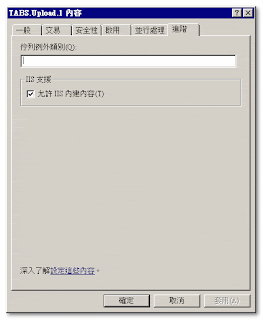
Under "Advanced" there is a check box for "Allow IIS intrinsic properties".
附註1: 經測試, 在同一個畫面, 同一時間執行 32bit 和 64bit 的 object.
附註2: 我用的 TABS 是 2.1版, 1.6版或 3.0版可能也ok.
執行畫面如下:
2011年6月9日 星期四
在x64 的 iis 下執行 32-bit Applications

測試結果: overpower(縮圖元件) 和 tabs(檔案上傳元件) 可以正常地被 create, tabs 可以上傳檔案.
相關文章: google 關鍵字下: vb6 x64 server.CreateObject
2010年1月19日 星期二
[Bat].重新啟動 IIS 和 Database 用的批次檔
| @echo off net stop iisadmin /y net start w3svc net stop mssqlserver /y net start mssqlserver net start sqlserveragent exit |