2011年6月20日 星期一

在x64 的 iis 下執行 32-bit Applications 的方法2

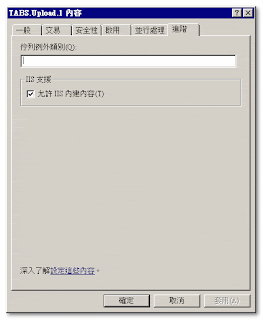
這次是不透過允許 32bit 應用程式(Enable 32-bit Applications) 的情況下, 來執行 32 bit 的 com+ object, 設定方試很簡單, 在元件裡按 "內容" -> "進階" -> "允許IIS內建內容" 打勾

Component Services -> Computers -> My Computer -> COM+ Applications
Open a COM+ Application object.
Open Components.
Right-click on a class and select Properties.
Under "Advanced" there is a check box for "Allow IIS intrinsic properties".

附註1: 經測試, 在同一個畫面, 同一時間執行 32bit 和 64bit 的 object.
附註2: 我用的 TABS 是 2.1版, 1.6版或 3.0版可能也ok.


執行畫面如下:
2011年6月9日 星期四

在x64 的 iis 下執行 32-bit Applications

在x64 的 iis 下執行 32-bit Applications 的方法, 就是在應用程式集區(Application pools) 裡允許 32bit 應用程式(Enable 32-bit Applications)


測試結果: overpower(縮圖元件) 和 tabs(檔案上傳元件) 可以正常地被 create, tabs 可以上傳檔案.


相關文章: google 關鍵字下: vb6 x64 server.CreateObject

分享 x64 環境下的縮圖元件--imageMagick

step 1: 先到 URL: http://www.imagemagick.org/script/binary-releases.php#windows
下載 windows-x64-dll.exe (Win64 dynamic at 16 bits-per-pixel)

step 2: 點2下 exe 檔, 安裝.

step 3: 執行 regsvr32:
C:\Program Files\ImageMagick-6.7.0-Q16> regsvr32 ImageMagickObject.dll

step 4: 測試縮圖 asp:

dim imObject
set imObject = createobject("ImageMagickObject.MagickImage.1")

dim myInputFile
dim myOutputFile

myInputFile = server.mapPath(".") & "\demo.jpg"
myOutputFile = server.mapPath(".") & "\demo_new.jpg"
imObjectReturn = imObject.Convert(myInputFile, "-resize=200x", myOutputFile)


response.write "Now:" & now()
response.write "轉檔完成囉!"


step 5: 大功告成.

2011年6月2日 星期四

身份驗證缺陷 (Broken Authentication)

今天在研究一份資料報告,有一個身份驗證缺陷 (Broken Authentication)的弱點. 我花了1小時, trace 程式, 和看報告, 終於找到原因, 我覺得當初寫程式的人真是豬頭, 居然會犯下醬子的錯. @_@;

程式1: member_edit.asp
他在 show form 時, 是從 session 裡去取得 user 當初 login 時的帳號(userid), 並把 userid 放到 form 裡的一個 hidden 欄位.


程式2: member_edit_act.asp
直接 request hidden 的欄位裡的值, 拿來做 SQL 的運算,
結果 user 把帳號值置換成別人的帳號, 就把別人的資料 overwrite 過去, 然後就可以用別人的帳號來 login.


為什麼當初寫的人, 會沒有想到這個問題?
需不需要做教育訓練?
如果一開始就可以寫出沒有弱點的程式, 該有多好. 呵呵呵.

2011年5月30日 星期一

用javascript 置換 className (Setting Styles with JavaScript)

方法1 (建議使用):
document.getElementById("myID").className = "myClassName";

方法2 (不建議使用):
document.getElementById("ID").setAttribute("class", "myClassName");

方法2, 在 GIP 的切換字體大小用的 styleswitcher.js 檔案裡可以看到.
這個方法, 在 IE6 + IE7 會失效, 在 IE8 或 FireFox+chrome 是 OK 的.

2011年5月24日 星期二

修改 IE 瀏覽器在 image map 時, 不顯示外框的方法

在使用 map 的 tag 時, IE 瀏覽器會在mouse click 時顯示一個很醜的 area 外框, 醜醜的外框長的像下面醬子:


解決方式: 在 img tag 裡增加 hidefocus="true" 的屬性即可.

特別感謝: 玟瑜 告訴我這個方法.

2011年5月19日 星期四

[IIS]. css 的 MIME type 會造成 firefox + chrome 顯示錯誤

畫面1: 左邊跑版, 右邊是 Error Message.


畫面2: 要設定一下 iis, 的設定, 不知道是那一個豬頭把 .* 給加上去, 氣死我了!

Facebook 留言板