2010年4月4日 星期日

檢查 SQL Server 有哪些索引應該被重建

如果不能直接執行的話, 要到資料庫屬性 => 選項 => 資料庫相容性層級,會出錯的資料庫相容性層級本來是SQL SERVER 2000(80),改成SQL Server 2005(90)即可。

下面的文章由 will 發表於 2009/1/18:

讓 SQL Server 告訴你有哪些索引應該被重建或重組

我去年有一段時間睡覺前都在看 SQL Server 2005 證照的書(MCTS 70-431),從中學到許多資料庫實際運作的技術細節,例如: 索引的結構。當資料庫中的索引碎裂(index fragmentation)程度過高時,索引的效率就會大大降低,為了避免這個問題發生,就必須定時替資料庫健檢(維護資料庫),也就是進行索引重建(rebuild)或索引重組(reorganize)。

Microsoft SQL Server 2005 實作與維護 Ⅱ 此書的第12章有提到你可以透過 SELECT 指令搭配 sys.dm_db_index_physical_stats 這個動態管理函示(DMF, Dynamic Management Function) 可以查出資料庫中所有索引的碎裂狀態,如下 T-SQL 語法:

SELECT OBJECT_NAME(dt.object_id) ,

si.name ,

dt.avg_fragmentation_in_percent,

dt.avg_page_space_used_in_percent

FROM

(SELECT object_id ,

index_id ,

avg_fragmentation_in_percent,

avg_page_space_used_in_percent

FROM sys.dm_db_index_physical_stats (DB_ID(), NULL, NULL, NULL, 'DETAILED')

WHERE index_id <> 0

) AS dt --does not return information about heaps

INNER JOIN sys.indexes si

ON si.object_id = dt.object_id

AND si.index_id = dt.index_id


執行後的結果長這樣:
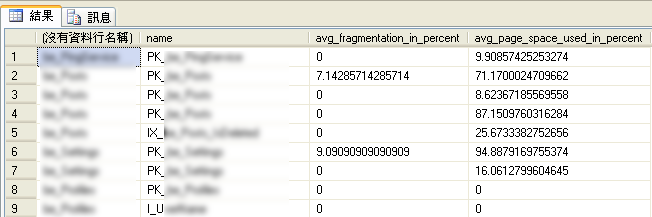
查出資料庫中所有索引的碎裂狀態

但何時該做索引重建(ALTER INDEX…REBUILD)?又何時該做索引重組(ALTER INDEX…REORGANIZE)呢?此書也有提供一些建議值供資料庫管理員在進行索引維護時的參考。

索引重組的時機

  • 檢查 External fragmentation 部分
    • 當 avg_fragmentation_in_percent 的值介於 10 到 15 之間
  • 檢查 Internal fragmentation 部分
    • 當 avg_page_space_used_in_percent 的值介於 60 到 75 之間

索引重建的時機

  • 檢查 External fragmentation 部分
    • 當 avg_fragmentation_in_percent 的值大於 15
  • 檢查 Internal fragmentation 部分
    • 當 avg_page_space_used_in_percent 的值小於 60

由於索引的維護都是透過 ALTER INDEX 進行的,所以即便索引的數據分析出來後還是要人工下 ALTER INDEX 指令來重建或重組索引。最近看到一篇文章分享一個很實用的 T-SQL 指令,他可以自動幫你算出哪些索引需要被重建或重組,而且直接幫你把 ALTER INDEX 的 T-SQL 都寫好,程式碼如下:


SELECT 'ALTER INDEX [' + ix.name + '] ON [' + s.name + '].[' + t.name + '] ' +

CASE

WHEN ps.avg_fragmentation_in_percent > 15

THEN 'REBUILD'

ELSE 'REORGANIZE'

END +

CASE

WHEN pc.partition_count > 1

THEN ' PARTITION = ' + CAST(ps.partition_number AS nvarchar(MAX))

ELSE ''

END,

avg_fragmentation_in_percent

FROM sys.indexes AS ix

INNER JOIN sys.tables t

ON t.object_id = ix.object_id

INNER JOIN sys.schemas s

ON t.schema_id = s.schema_id

INNER JOIN

(SELECT object_id ,

index_id ,

avg_fragmentation_in_percent,

partition_number

FROM sys.dm_db_index_physical_stats (DB_ID(), NULL, NULL, NULL, NULL)

) ps

ON t.object_id = ps.object_id

AND ix.index_id = ps.index_id

INNER JOIN

(SELECT object_id,

index_id ,

COUNT(DISTINCT partition_number) AS partition_count

FROM sys.partitions

GROUP BY object_id,

index_id

) pc

ON t.object_id = pc.object_id

AND ix.index_id = pc.index_id

WHERE ps.avg_fragmentation_in_percent > 10

AND ix.name IS NOT NULL


這段 T-SQL 只有檢查 External fragmentation 部分而已,而且上面分享的這段 T-SQL 語法與原文的數值不太一樣,我有調整過,讓判斷的臨界值符合 Microsoft SQL Server 2005 實作與維護 Ⅱ 書中建議的數值。以下是執行結果的圖示:

自動幫你算出哪些索引需要被重建或重組的結果

你只要複製這些語法,並且執行一遍,就可以完成索引維護了。

相關連結


2010年3月26日 星期五

URL 排程小工具(maxGet v1.0)

程式目的:
執行某一個 URL.執行完後程式會自動關閉.


檔案下載:
maxURLTask.zip Download


執行畫面:
1. 由於執行的網址, 可能有安全性上考量,所以會被擋下來.


2. 請到 "安全性" 做設定, 把該 domain name 加到 "信任的網站" 中.


3. 設定完成後, 即可正常使用該程式, 如果有需要做測試, 就在該程式的參數加上 debug=1.


相關工具:
wget , ie

2010年3月19日 星期五

[Asp].資料複制的副程式

程式目的: 單筆資料做複制.

範例1, 主檔資料做 copy:

newMainID = insertIntoSameTableByWhere("mainTable","","mainID=" & mainID)

這個附程式會把 mainTable 的某筆資料 copy 到 mainTable 中, 而 newMainID 是 mainTable 新的流水號.


範例2, 第2層的副檔資料做 copy:
newDetailID = insertIntoSlaveTableByWhere("detailTable","","maindID=" & mainID & " and detailID=" & detailID,"mainID", newMainID)

這個附程式會把 detailTable 的某筆資料 copy 到 detailTable 中,
而 newMainID 是 mainTable 新的流水號, 透該副程式一併 insert 到新的資料中.
該副程式會取得插入資料到第2層副檔後的流水號 (newDetailID).


範例3, 第3層的副檔資料做 copy:
call insertIntoSlaveTableByWhere("detailItemTable","","mainID=" & mainID & " and detailID=" & detailID,"mainID,detailID", newMainID & "," & newDetailID)

這個附程式會把第3層的副檔(detailItemTable) 的某筆舊的 detailID 的資料 copy 到 detailTable 中,
而 newMainID 是 mainTable 新的流水號, 透該副程式一併 insert 到新的資料中.
而 newDetailID 是 detailTable 新的流水號, 透該副程式一併 insert 到新的資料中.
雖然該副程式會傳回插入資料到第3層副檔後的流水號, 由於不需要再做處理, 所以改用 call sub.


副件檔案:
max.DB.Function.asp

download:

2010年2月25日 星期四

IIS 7 允許檔案名稱有+ 號

解決方式:
使用 [以系統管理員身分執行] 選項開啟命令提示字元,並將目錄變更至 %windir%\system32\inetsrv
啟用雙重逸出,請在命令提示字元輸入下列命令,然後按 ENTER:

appcmd set config /section:requestfiltering /allowdoubleescaping:true

執行畫面:


相關文章:


IIS7 rejecting URLs containing + .

Here is the deal. The IIS7 request filter rejects URLs containing + characters. We do this because the + character is a dangerous choice. Some standards, e.g. the CGI standard require +'s to be converted into spaces. This can become a problem if you have code that implements name-based rules, for example urlauthorization rules that base their decisions on some part of the url.
Here is a cooked up example:
Let's suppose you have code that evaluates the following rule:


With the ambiguity of leaving +'s in place or converting +'s to spaces there is a possiblity that your rule engine allows access to a non-Admin, for example if the attacker enters http://myserver/my+vdir. The "my vdir" authorization rule won't match because your authorization code searches for the string "my+vdir" but your rule says "my vdir". Your rule won't apply and the attacker gets access.

If you absolutely want to have spaces you can simply turn off the doubleEscaping feature for your application, for your site or for the whole server. Here is an example:

%windir%\system32\inetsrv\appcmd set config "Default Web Site" -section:system.webServer/security/requestfiltering -allowDoubleEscaping:true


2010年2月24日 星期三

IIS 7掛載網芳的虛擬目錄

慢慢地, 用 windows 20008 + iis 7 的伺服器會愈來愈多, 可以先學起來, 以後可能可以用的到, 方法應該不只一個, 這只是解法的一種.

環境:

兩台 Windows Server 2008 + IIS 7 伺服器
主機1: 192.168.x.1
主機2: 192.168.x.2

網站共享的檔案都放在檔案伺服器上,網路分享的 UNC 路徑為 \\192.168.x.2\Public
我需要在192.168.x.1 網站根目錄下建立一個 Public 虛擬目錄,並且目錄需對應到 \\192.168.x.2\Public 分享目錄。


設定步驟:

1. 新增一個應用程式集區(Application Pool):
新增應用程式集區時,名稱自己取,但是 .Net Framework 版本務必選取「沒有 Managed 程式碼」!


2. 接著並不是新增「虛擬目錄」,而是要新增「應用程式」, 虛擬目錄按右鍵後, 也可以轉換成應用程式.

接著必須設定別名、選取正確的應用程式集區、設定實體路徑(UNC路徑)、設定連線身份設定「連線身份」時,記得在開放分享目錄的那台主機(192.168.x.2),與 WebFarm (192.168.x.1) 中的成員主機,都必須要有同樣一組帳號、密碼,才能正確透過 UNC 存取檔案,否則一樣會導致權限不足無法存取檔案的情況。


相關文章:

2010年2月11日 星期四

[SQL].列資料轉成欄資料

目的:
分享一個 T-Sql 句子, 把列裡的資料, 轉成欄位裡.

當有一筆資料, 某一個欄位是做一對多 (例如: checkbox), 想要把 的那些資料一口氣串在 的那一筆的某個欄位裡, 可以試看看這樣做.


執行畫面:

1. 原始資料如下:
SQL: select * from testTable


2. 把列資料轉成欄資料:
SQL:
select * from testTable
DECLARE @SQL Varchar(max)
select @SQL=''
SELECT @SQL=@SQL + '' + convert(varchar(20),id) + ','
FROM testTable
select @SQL


幫 function 整理及包裝一下後, 就可以用
SQL: select [dbo].[fn_getTestTitles]('1,3')
來取出第id=1及3 這2筆的資料.


包裝了2個 function 如下:
CREATE FUNCTION [dbo].[fn_getTestTitles](@myData varchar(200))
RETURNS nvarchar(2000)
AS
BEGIN
DECLARE @SQL Varchar(max)
select @SQL=''
SELECT @SQL=@SQL + '' + title + char(13) + char(10)
FROM testTable
where id in (select data from dbo.fn_slip_str(@myData,','))
RETURN (@SQL)
END


Create Function fn_slip_str( @InStr nvarchar(2000) , @s_char nvarchar(1) )
Returns @tb Table ( sno int , data nvarchar(100) )
As
Begin
Set @InStr = @s_char + @InStr + @s_char;
Declare @p1 Int , @p2 Int , @data nvarchar(100) , @sno int;
Set @p1 = -1 ; Set @p2 = -1 ; Set @data = '' ; Set @sno = 0;
While ( 0 Not In (@P1,@P2) ) Begin
Set @p1 = CharIndex(@s_char,@InStr,@p1+1);
Set @p2 = CharIndex(@s_char,@InStr,@p1+1);
If ( 0 In (@p1,@p2) )
Break;
Set @data = SubString(@InStr,@p1+1,@p2-@p1-1);
if ( @data <> '' ) Begin
Set @sno = @sno +1;
Insert Into @tb ( sno , data ) Values ( @sno , @data )
End
End
Return
End


相關文章:

2010年2月10日 星期三

[js].分享日曆元件


執行畫面:


使用方式:
step 1: 加入 include

step 2: 在產生出來的欄位後方, 加入這一段 javascript script:


附件: Download

Facebook 留言板